

Types of Tools
🧰 Built-in Tools
🔌 MCP Tools
🧰 Built-in Tools
Agentix comes with a variety of built-in tools that can be enabled per agent. These tools support key use cases like user interaction, task control and system integration.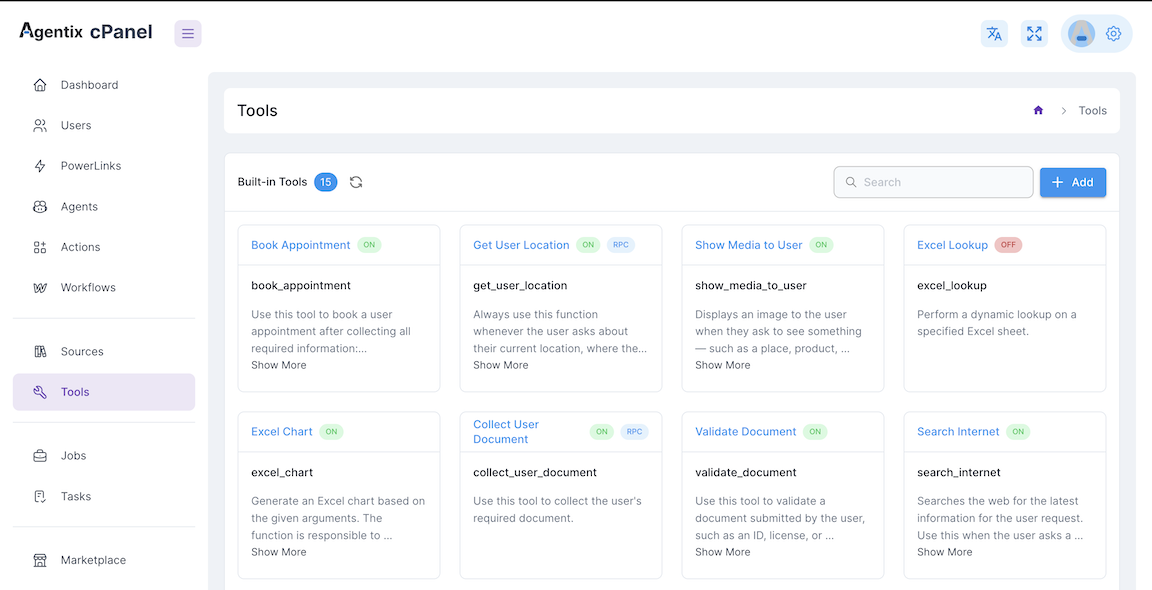
- Tools executed at Agent-Side
- Tools executed at User-Side using RPC protocol
Example of available Built-in Tools - Executed at Agent-Side
These tools are executed by the agent itself, allowing it to perform actions like searching the internet or showing media to the user.search_internet
Performs web searches to find real-time information from the internet
search_internet
Performs web searches to find real-time information from the internet
Use Cases:
- Research current events or trending topics
- Find product details, prices or specifications
- Gather real-time data and statistics
- Verify facts or get updated information
show_media_to_user
Displays images, documents or visual content to users during conversations
show_media_to_user
Displays images, documents or visual content to users during conversations
Use Cases:
- Show product catalogs or image galleries
- Display forms, contracts or documentation
- Present charts, diagrams or infographics
- Share visual instructions or tutorials
submit_workflow_task, reject_workflow_task, record_task_output
Controls task completion, rejection and output recording in workflows
submit_workflow_task, reject_workflow_task, record_task_output
Controls task completion, rejection and output recording in workflows
Functions:
submit_workflow_task- Marks task as complete and submits resultsreject_workflow_task- Rejects task with specified reasoningrecord_task_output- Saves task results for downstream processing
Use Cases:
- Quality assurance and approval workflows
- Task completion tracking and reporting
- Workflow state management and routing
handoff, cancel_handoff, end_conversation
Manages agent transitions and conversation termination
handoff, cancel_handoff, end_conversation
Manages agent transitions and conversation termination
Functions:
handoff- Transfers conversation to a human agent with contextcancel_handoff- Cancels pending handoff requestsend_conversation- Gracefully terminates the conversation
- Escalating complex issues to human support
- Transferring specialized queries to experts
- Completing conversations after resolution
Example of available Built-in Tools - Executed at User-Side
These tools are executed by the user while triggered by Agent, allowing them to provide information or perform visual actions that the agent can use.get_user_location
Requests user's current geolocation coordinates using device GPS
get_user_location
Requests user's current geolocation coordinates using device GPS
Use Cases:
- Finding nearby stores or service locations
- Delivery address verification and routing
- Location-based compliance and regulations
- Regional content customization
collect_user_document
Prompts users to upload files and documents through file picker
collect_user_document
Prompts users to upload files and documents through file picker
Use Cases:
- Identity verification and KYC processes
- Insurance claim document submission
- Contract and agreement uploads
- Medical records and prescription collection
request_user_input
Displays custom forms in Task Action Panel for structured data collection
request_user_input
Displays custom forms in Task Action Panel for structured data collection
Use Cases:
- Customer registration and onboarding forms
- Survey and feedback data collection
- Order customization and preferences
- Contact information and profile updates
🔌 MCP Tools
MCP (Model Context Protocol) tools allow you to connect your agent to external APIs or microservices that expose callable tools. These tools are defined and served by an MCP server.How MCP Tools Work
- Define and run your MCP server (in Python or Node.js)
- Each tool is defined with:
- Tool name
- Description / Usage Instructions
- Add the MCP server URL in the Tools section
- Add the tool names under the server
- Select which tools from the server to enable for your agent in action
Example MCP Tool Definition
Tool Readiness Matrix
How to Create and Assign Tools
Open Tools in cPanel
Manage Available Tools
- For built-in, check the tool names from the list
- For MCP, paste your MCP server URL and define which tools to expose
Open PowerLink → Actions → Tools
Choose the Tool
Save and Test
Next: Define what Sources your agent can access by visiting the Sources section.