> ## Documentation Index
> Fetch the complete documentation index at: https://docs.agentixhub.ai/llms.txt
> Use this file to discover all available pages before exploring further.

# Realtime

> Launch real-time interactions with AI or human agents

<div
  style={{
border: '1px solid #6366f1',
borderRadius: '6px',
padding: '8px 12px',
fontSize: '0.85rem',
backgroundColor: 'rgba(99, 102, 241, 0.05)',
}}
>
  <div className="badge-guided">guided</div>

  <div>
    This PowerLink runs in guided mode — it launches a real-time session with a human or AI agent.
  </div>
</div>

The **Realtime** PowerLink launches a **live audio, video or chat session** between the customer and an agent. It supports AI agents (via LiveKit) or human agents from your workforce. You can customize language, input identity and session behavior before starting the interaction.

## Key Features

<CardGroup cols={2}>
  <Card title="🎙️ Live Audio or Video">
    Launch real-time calls powered by LiveKit (AI or human).
  </Card>

  <Card title="🤖 Supports AI Agents">
    Use AI agents to handle live sessions with integrated STT/LLM.
  </Card>

  <Card title="📞 Human Agent Routing">
    Connect the session to a waiting human agent (optional).
  </Card>

  <Card title="🌍 Language & Identity Control">
    Configure language, identity and session metadata dynamically.
  </Card>
</CardGroup>

## How to Install

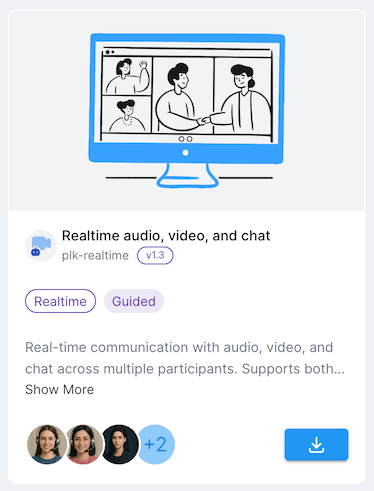
Go to the **Store** tab in Agentix cPanel, find **Realtime** and click **Install** to add it to your PowerLinks list.

<img src="https://mintcdn.com/agentix-5c0a3d87/3fWHT_5u43zyi8Am/user-guide/images/catalogue-realtime.png?fit=max&auto=format&n=3fWHT_5u43zyi8Am&q=85&s=b817e2392e1e203f366885e5e507b51e" alt="Catalogue snapshot" className="rounded-xl my-6 shadow" width={250} data-path="user-guide/images/catalogue-realtime.png" />

## How it Works

When this PowerLink is triggered, it prepares session metadata, configures connection identity and launches a live session with either an AI agent (default) or a routed human agent. The session can include audio, video or chat and runs on LiveKit infrastructure.

<Check>
  You can control the launch behavior using input parameters like `LANGUAGE`, `CALL_TYPE` or `TELEPHONY_WEB_PANEL_IDENTITY`. The session is launched immediately after the task starts.
</Check>

<Note>
  This PowerLink is meant to be triggered from LaunchPad or via API. It's ideal for workflows where customer input must be handled **live** in real time.
</Note>

## How it Looks for Customers

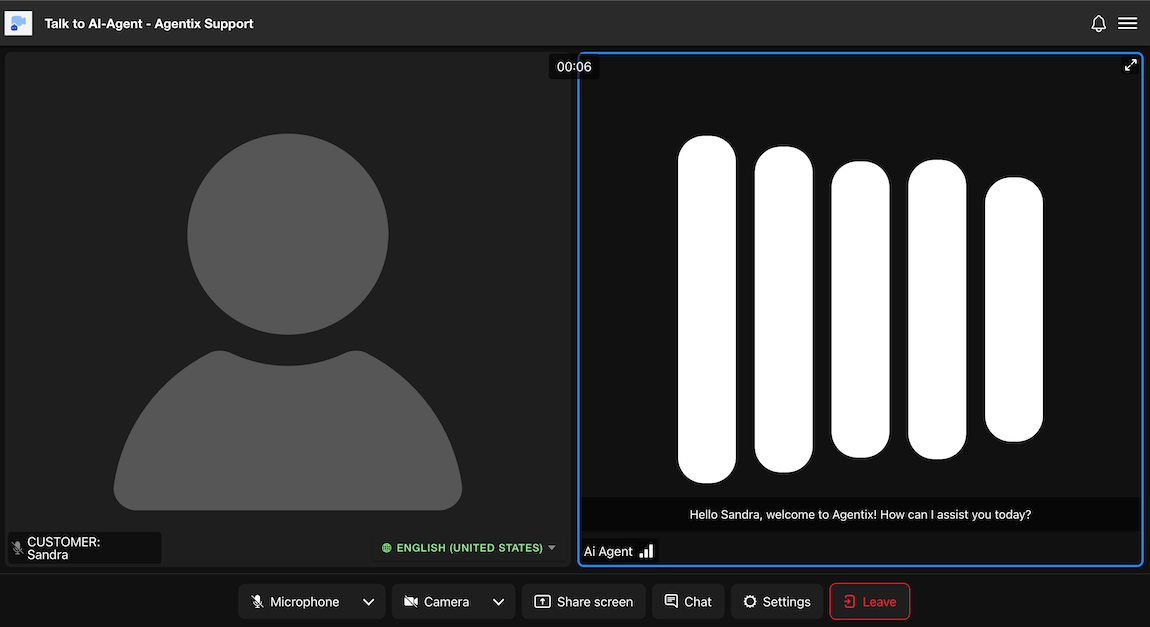
This is how the real-time session interface appears to customers when triggered by a LaunchPad or invitation link. The layout works across desktop and mobile, providing an intuitive experience for video or audio interactions.

<img src="https://mintcdn.com/agentix-5c0a3d87/nRZdjUb99nMM2ncE/user-guide/images/realtime-customer.png?fit=max&auto=format&n=nRZdjUb99nMM2ncE&q=85&s=b5af4b9907e0484cccdf041b70bc5f76" alt="Customer view of Realtime Agent" className="rounded-md my-6 shadow" width="1150" height="627" data-path="user-guide/images/realtime-customer.png" />

### Key Interface Components

* **Left Panel (Customer View):**\
  Displays the customer’s avatar or video feed (if camera is enabled). The name and language are shown at the bottom left.

* **Right Panel (Agent View):**\
  Shows the AI or human agent. When using AI, the agent displays a branding visual along with transcribed responses as subtitles.

* **Bottom Toolbar:**\
  Customers can mute/unmute their microphone, turn camera on/off, share screen, open chat, adjust settings or leave the session.

<Check>
  The AI or human agent handles the entire conversation. No manual submission or rejection is required from the customer side.
</Check>

<Info>
  Sessions may be voice-only or video-enabled depending on your workflow configuration and assigned agent capabilities.
</Info>

<Info>
  This interface also supports multiparty conferences. When additional participants join, the layout automatically adjusts to accommodate them.
</Info>

## Configuration Parameters

These parameters control the behavior of the Realtime PowerLink at the **PowerLink level**, such as call recording, pre-join prompts and outbound dialer settings.

<Expandable title="Configuration Parameters">
  <ParamField path="USER_PROMPT" type="TEXT" default="Welcome to the video call. You may click on join to enter call room.">
    Disclaimer text to display prior to joining the call. Supports basic HTML.
  </ParamField>

  <ParamField path="GUEST_INVITE" type="LIST" default="ON">
    Allow users to generate invitation links for guest users.
  </ParamField>

  | Value | Description                   |
  | ----- | ----------------------------- |
  | `ON`  | Enable guest invitation link  |
  | `OFF` | Disable guest invitation link |

  <ParamField path="RECORDER" type="LIST" default="OFF">
    Enable or disable recording of the call session.
  </ParamField>

  | Value | Description            |
  | ----- | ---------------------- |
  | `ON`  | Enable call recording  |
  | `OFF` | Disable call recording |

  <ParamField path="RECORDER_LAYOUT" type="LIST" default="grid">
    Specify the layout for recorded output.
  </ParamField>

  | Value     | Description                        |
  | --------- | ---------------------------------- |
  | `grid`    | All participants shown equally     |
  | `speaker` | Focuses on the active speaker      |
  | `single`  | Only one participant shown at once |

  <ParamField path="ALLOWED_TASK_ACTIONS" type="MULTI">
    Select which task actions to show or hide for the user (not the customer). The selected actions will appear in the user’s task actions menu.
  </ParamField>

  | Task Action                | Description                                  |
  | -------------------------- | -------------------------------------------- |
  | `getUserLocation`          | Requests the user's geolocation              |
  | `mediaUpload:Personal ID`  | Upload of a personal identification document |
  | `mediaUpload:Passport`     | Upload of passport image                     |
  | `mediaUpload:Selfie`       | Capture and upload of a selfie               |
  | `mediaUpload:Utiltiy Bill` | Upload of a utility bill                     |
  | `mediaUpload`              | General media upload (image or document)     |

  <ParamField path="SOURCE_LANGUAGE" type="MULTI" default="en-US">
    List of languages supported in the session. Displayed to the user during pre-join. Default language is always the first one in the list order.
  </ParamField>

  <Note>
    You can add any language locale later and select it in the agent assignement.
  </Note>

  <ParamField path="START_MODE" type="LIST" default="audio-video">
    Specifies the initial mode for the session.
  </ParamField>

  | Mode          | Description            |
  | ------------- | ---------------------- |
  | `audio-video` | Start with audio/video |
  | `chat`        | Start with chat only   |

  <ParamField path="HIDE_LOCAL_TITLE" type="LIST" default="OFF">
    Hide or show the local participant's title in the call interface.
  </ParamField>

  | Value | Description                  |
  | ----- | ---------------------------- |
  | `ON`  | Hide local participant title |
  | `OFF` | Show local participant title |

  <ParamField path="OUTBOUND_TRUNK_CONFIG" type="TEXT">
    Trunk configuration for outbound dialer agent. Use this format:\
    `{ TRUNK_NAME=telnyx-outbound-trunk, SIP_ADDRESS=sip.telnyx.com, AUTH_USERNAME=username, AUTH_PASSWORD=password }`
  </ParamField>

  <ParamField path="OUTGOING_CALLING_NUMBER" type="TEXT">
    Phone number to use for outbound calls.
  </ParamField>

  <ParamField path="ACTION_PANEL" type="LIST" default="ON">
    Enable/Disable action panel for the user.
  </ParamField>

  | Value | Description          |
  | ----- | -------------------- |
  | `ON`  | Enable action panel  |
  | `OFF` | Disable action panel |

  <ParamField path="VISUALIZER_BACKGROUND_IMAGE" type="MEDIA">
    Background image for AI agent during the conversation.
  </ParamField>

  <ParamField path="VISUALIZER_TYPE" type="LIST" default="3D-SPHERE">
    Select the visualizer type for AI agent during the conversation.
  </ParamField>

  | Value       | Description                                  | Preview                                                                                                                                                                         |
  | ----------- | -------------------------------------------- | ------------------------------------------------------------------------------------------------------------------------------------------------------------------------------- |
  | `BAR`       | Bar visualizer with audio wave patterns      | <img src="https://mintlify.s3.us-west-1.amazonaws.com/agentix-5c0a3d87/user-guide/images/visualizer-bar.png" alt="Bar Visualizer" width="60" className="rounded" />             |
  | `3D-SPHERE` | 3D sphere visualizer with dynamic animations | <img src="https://mintlify.s3.us-west-1.amazonaws.com/agentix-5c0a3d87/user-guide/images/visualizer-3d-sphere.png" alt="3D Sphere Visualizer" width="60" className="rounded" /> |

  <ParamField path="VISUALIZER_CONFIG" type="TEXT" default="{\n  &#x22;width&#x22;: 450,\n  &#x22;height&#x22;: 450,\n  &#x22;state_label&#x22;: &#x22;ON&#x22;,\n  &#x22;state_colors&#x22;: {\n    &#x22;disconnected&#x22;: &#x22;#333333&#x22;,\n    &#x22;connecting&#x22;: &#x22;#FFAA00&#x22;,\n    &#x22;initializing&#x22;: &#x22;#00AAFF&#x22;,\n    &#x22;listening&#x22;: &#x22;#00FF88&#x22;,\n    &#x22;thinking&#x22;: &#x22;#AA00FF&#x22;,\n    &#x22;speaking&#x22;: &#x22;#88DDFF&#x22;\n  }\n}">
    Configuration options for the AI agent visualizer. This JSON object controls the appearance and behavior of the visualizer during different conversation states.

    **Configuration Structure:**

    ```json theme={null}
    {
      "width": 450,              // Width of the visualizer in pixels
      "height": 450,             // Height of the visualizer in pixels
      "state_label": "ON",       // Display state labels: "ON" or "OFF"
      "state_colors": {
        "disconnected": "#333333", // Color when agent is disconnected (dark gray)
        "connecting": "#FFAA00",   // Color when establishing connection (amber)
        "initializing": "#00AAFF", // Color during initialization (bright blue)
        "listening": "#00FF88",    // Color when agent is listening (green)
        "thinking": "#AA00FF",     // Color when agent is processing (purple)
        "speaking": "#88DDFF"      // Color when agent is speaking (light blue)
      }
    }
    ```

    **Parameter Details:**

    * `width` & `height`: Control the size of the visualizer canvas (recommended: 450x450)
    * `state_label`: Shows current state text below visualizer when set to "ON"
    * `state_colors`: Hex color codes for different conversation states
      * **disconnected**: No active connection
      * **connecting**: Establishing connection to agent
      * **initializing**: Loading agent and preparing session
      * **listening**: Agent is actively listening to user input
      * **thinking**: Agent is processing user request
      * **speaking**: Agent is providing response

    <Note>
      Use standard hex color codes (e.g., #FF0000 for red). Colors should provide good contrast and be accessible for all users.
    </Note>
  </ParamField>

  <ParamField path="QUEUE_WAITING_MESSAGE" type="TEXT" default="We are experiencing a high number of requests right now.\nThank you for your patience while we connect you to the next available assistant.">
    Message to display while waiting in the queue.
  </ParamField>
</Expandable>

## Agents

Here is list of available agents that can be used with this PowerLink. Each agent has its own set of parameters that can be configured to suit your use-case.

<Card horizontal>
  <div id="agent-multimodal" className="flex items-center gap-4">
    <div className="w-20 h-auto flex-shrink-0">
      <img src="https://mintcdn.com/agentix-5c0a3d87/3fWHT_5u43zyi8Am/user-guide/images/agent-multimodal.png?fit=max&auto=format&n=3fWHT_5u43zyi8Am&q=85&s=1627d60e8bb7fdc43f110b2364c9ac1c" alt="Multimodal Realtime Agent" className="rounded-sm w-full h-full object-contain m-0" width="326" height="431" data-path="user-guide/images/agent-multimodal.png" />
    </div>

    <div>
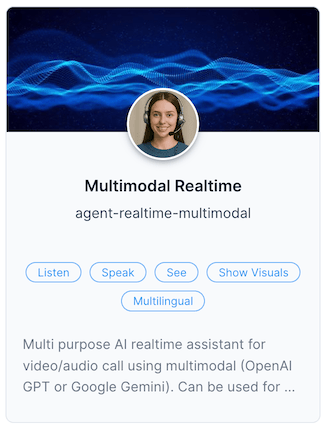
      <strong className="text-lg">Multimodal Realtime Agent</strong><br />
      AI Agent for video/audio calls using multimodal realtime LLMs (OpenAI GPT or Google Gemini) that support audio input and output in real time.
    </div>
  </div>

  <Expandable title="Agent Parameters">
    <ParamField path="LLM" type="LIST" default="openai:gpt-4o-mini-realtime-preview">
      Select the LLM provider and model for the assistant.
    </ParamField>

    | Provider | Model                                               |
    | -------- | --------------------------------------------------- |
    | OpenAI   | `gpt-4o-mini-realtime-preview-2024-12-17`           |
    | OpenAI   | `gpt-4o-realtime-preview-2024-12-17`                |
    | OpenAI   | `gpt-4o-realtime-preview`                           |
    | OpenAI   | `gpt-4o-mini-realtime-preview`                      |
    | Google   | `gemini-2.0-flash-exp`                              |
    | Google   | `gemini-2.0-flash-live-001`                         |
    | Google   | `gemini-2.5-flash-preview-native-audio-dialog`      |
    | Google   | `gemini-2.5-flash-exp-native-audio-thinking-dialog` |

    <ParamField path="TEMPERATURE" type="TEXT" default="0.8">
      Temperature control from 0-1 (Default: 0.8). Minimum allowed temperature is 0.6.
    </ParamField>

    <ParamField path="VOICE" type="LIST" default="openai:alloy">
      Select the voice for the assistant.
    </ParamField>

    | Provider | Voice Options                                                         |
    | -------- | --------------------------------------------------------------------- |
    | OpenAI   | `alloy`, `ash`, `ballad`, `coral`, `echo`, `sage`, `shimmer`, `verse` |
    | Google   | `Puck`, `Charon`, `Kore`, `Fenrir`, `Aoede`, `Leda`, `Orus`, `Zephyr` |

    <ParamField path="PRONUNCIATIONS" type="TEXT">
      Add custom pronunciation rules for names and terms. Use multi-line format with trailing semicolon.

      **Format:** `language_code|name=pronunciation;`

      **Examples:**

      ```
      en|1=One;
      ar|2=اثنان;
      fr|3=trois;
      ```
    </ParamField>

    <ParamField path="VERBALIZE_NUMBERS" type="LIST" default="OFF">
      Control whether numbers in RAG content are verbalized during conversation.
    </ParamField>

    | Value | Description                       |
    | ----- | --------------------------------- |
    | `ON`  | Verbalize numbers in conversation |
    | `OFF` | Do not verbalize numbers          |

    <ParamField path="USER_RESPONSE_TIMEOUT" type="TEXT" default="30">
      Timeout for user response in seconds.
    </ParamField>

    <ParamField path="MAX_REMINDERS" type="TEXT" default="3">
      Maximum number of reminders to send to the user before considering hangup.
    </ParamField>

    <ParamField path="HANDOFF" type="LIST" default="OFF">
      Select the handoff provider for the assistant. Disable by selecting OFF.
    </ParamField>

    | Value      | Description                        |
    | ---------- | ---------------------------------- |
    | `OFF`      | No handoff capability              |
    | `NOVOMIND` | Integration with Novomind platform |

    <ParamField path="HANDOFF_PLUGIN_URL" type="TEXT">
      Custom handoff plugin URL for the assistant.
    </ParamField>

    <ParamField path="HANDOFF_LIVE_ASSIST_AGENT" type="LIST" default="OFF">
      Live assist agent to dispatch call upon successful handoff.
    </ParamField>

    | Value               | Description                   |
    | ------------------- | ----------------------------- |
    | `OFF`               | No live assist integration    |
    | `agent-live-assist` | Standard live assist agent    |
    | `live-assist-agent` | Alternative live assist agent |

    <ParamField path="WHATSAPP_NOTIFICATION" type="LIST" default="OFF">
      Select WhatsApp notification provider for the assistant.
    </ParamField>

    | Value      | Description                       |
    | ---------- | --------------------------------- |
    | `OFF`      | No WhatsApp notifications         |
    | `NOVOMIND` | WhatsApp integration via Novomind |

    <ParamField path="EMAIL_NOTIFICATION" type="LIST" default="OFF">
      Select Email notification provider for the assistant.
    </ParamField>

    | Value | Description            |
    | ----- | ---------------------- |
    | `OFF` | No email notifications |

    <ParamField path="BACKGROUND_AUDIO" type="MULTI">
      Select background audio options for the conversation environment.
    </ParamField>

    | Option            | Description            |
    | ----------------- | ---------------------- |
    | `OFFICE_AMBIENCE` | Office ambient sounds  |
    | `music01.ogg`     | Background music track |

    <ParamField path="BACKGROUND_AUDIO_VOLUME" type="TEXT" default="0.5">
      Volume level for background audio (0-1 range, e.g., 0.5 for 50%).
    </ParamField>

    <ParamField path="THINKING_SOUND" type="MULTI" default="KEYBOARD_TYPING,KEYBOARD_TYPING2">
      Select sound effects to play while the agent is in thinking state.
    </ParamField>

    | Option             | Description                       |
    | ------------------ | --------------------------------- |
    | `KEYBOARD_TYPING`  | Keyboard typing sound effect      |
    | `KEYBOARD_TYPING2` | Alternative keyboard typing sound |
    | `bell.ogg`         | Bell notification sound           |
    | `screenshot.ogg`   | Screenshot capture sound          |

    <ParamField path="THINKING_SOUND_VOLUME" type="TEXT" default="0.8">
      Volume level for thinking sounds (0-1 range, e.g., 0.8 for 80%).
    </ParamField>

    <ParamField path="AVATAR" type="LIST" default="OFF">
      Select the avatar for the assistant. Choose OFF to disable or select a provider.
    </ParamField>

    | Avatar   | Configuration                                                   |
    | -------- | --------------------------------------------------------------- |
    | `OFF`    | No avatar                                                       |
    | `Sandra` | `tavus:name=Sandra\|replica=r9fa0878977a\|persona=pc074769bad9` |
    | `Steph`  | `tavus:name=Steph\|replica=r9c55f9312fb\|persona=pc074769bad9`  |
    | `James`  | `tavus:name=James\|replica=r70c81a0519b\|persona=pc074769bad9`  |

    <ParamField path="TELEPHONY_WEB_PANEL" type="LIST" default="OFF">
      Enable telephony web panel integration. When enabled, the AI agent will send notifications to users to open the web panel.
    </ParamField>

    | Value | Description                 |
    | ----- | --------------------------- |
    | `ON`  | Enable telephony web panel  |
    | `OFF` | Disable telephony web panel |
  </Expandable>
</Card>

<Card horizontal>
  <div id="agent-voicepipeline" className="flex items-center gap-4">
    <div className="w-20 h-auto flex-shrink-0">
      <img src="https://mintcdn.com/agentix-5c0a3d87/3fWHT_5u43zyi8Am/user-guide/images/agent-voicepipeline.png?fit=max&auto=format&n=3fWHT_5u43zyi8Am&q=85&s=6c073cbd0b70dfc46f2fb90dbe1d07e2" alt="Voice Pipeline Agent" className="rounded-sm w-full h-full object-contain m-0" width="325" height="427" data-path="user-guide/images/agent-voicepipeline.png" />
    </div>

    <div>
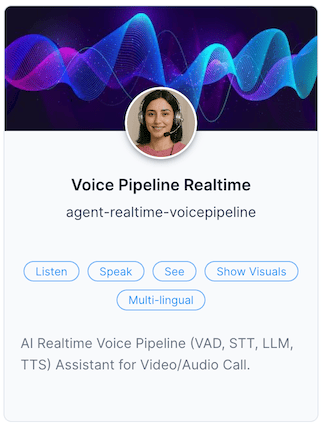
      <strong className="text-lg">Voice Pipeline Realtime Agent</strong><br />
      AI Agent for video/audio calls using a voice pipeline supporting different providers — voice activity detection, speech-to-text (STT), LLM processing and text-to-speech (TTS).
    </div>
  </div>

  <Expandable title="Agent Parameters">
    <ParamField path="STT" type="LIST" default="openai:whisper-1">
      Select the Speech-to-Text provider and model.
    </ParamField>

    | Provider    | Model              |
    | ----------- | ------------------ |
    | OpenAI      | `whisper-1`        |
    | Google      | `latest_long`      |
    | Google      | `nova-2`           |
    | Groq        | `whisper-large-v3` |
    | Deepgram    | `nova-2`           |
    | Azure       | `whisper`          |
    | Assembly AI | `best`             |
    | AWS         | `transcribe`       |

    <ParamField path="LLM" type="LIST" default="openai:gpt-4o">
      Select the LLM provider and model for the assistant.
    </ParamField>

    | Provider | Model                        |
    | -------- | ---------------------------- |
    | OpenAI   | `gpt-4o`                     |
    | OpenAI   | `gpt-4o-mini`                |
    | OpenAI   | `o1`                         |
    | OpenAI   | `o1-mini`                    |
    | OpenAI   | `o1-preview`                 |
    | Google   | `gemini-1.5-flash`           |
    | Google   | `gemini-1.5-pro`             |
    | Google   | `gemini-exp-1206`            |
    | Groq     | `llama-3.3-70b-versatile`    |
    | Groq     | `llama-3.2-90b-text-preview` |
    | Claude   | `claude-3-5-sonnet-20241022` |
    | Mistral  | `mistral-large-2407`         |
    | xAI      | `grok-beta`                  |

    <ParamField path="TTS" type="LIST" default="openai:tts-1">
      Select the Text-to-Speech provider and model.
    </ParamField>

    | Provider   | Model                    | Voice Options                                                                                                    |
    | ---------- | ------------------------ | ---------------------------------------------------------------------------------------------------------------- |
    | OpenAI     | `tts-1`                  | `alloy`, `echo`, `fable`, `onyx`, `nova`, `shimmer`                                                              |
    | OpenAI     | `tts-1-hd`               | `alloy`, `echo`, `fable`, `onyx`, `nova`, `shimmer`                                                              |
    | ElevenLabs | `eleven_multilingual_v2` | Various premium voices                                                                                           |
    | Google     | `standard`               | Multiple language voices                                                                                         |
    | Azure      | `neural`                 | Multiple language voices                                                                                         |
    | Deepgram   | `aura`                   | `asteria`, `luna`, `stella`, `athena`, `hera`, `orion`, `arcas`, `perseus`, `angus`, `orpheus`, `helios`, `zeus` |

    <ParamField path="TEMPERATURE" type="TEXT" default="0.8">
      Temperature control from 0-1 (Default: 0.8). Minimum allowed temperature is 0.6.
    </ParamField>

    <ParamField path="VOICE" type="TEXT" default="alloy">
      Select the voice for the assistant based on the TTS provider chosen above.
    </ParamField>

    <ParamField path="PRONUNCIATIONS" type="TEXT">
      Add custom pronunciation rules for names and terms. Use multi-line format with trailing semicolon.

      **Format:** `language_code|name=pronunciation;`

      **Examples:**

      ```
      en|1=One;
      ar|2=اثنان;
      fr|3=trois;
      ```
    </ParamField>

    <ParamField path="VERBALIZE_NUMBERS" type="LIST" default="OFF">
      Control whether numbers in RAG content are verbalized during conversation.
    </ParamField>

    | Value | Description                       |
    | ----- | --------------------------------- |
    | `ON`  | Verbalize numbers in conversation |
    | `OFF` | Do not verbalize numbers          |

    <ParamField path="USER_RESPONSE_TIMEOUT" type="TEXT" default="30">
      Timeout for user response in seconds.
    </ParamField>

    <ParamField path="MAX_REMINDERS" type="TEXT" default="3">
      Maximum number of reminders to send to the user before considering hangup.
    </ParamField>

    <ParamField path="HANDOFF" type="LIST" default="OFF">
      Select the handoff provider for the assistant. Disable by selecting OFF.
    </ParamField>

    | Value      | Description                        |
    | ---------- | ---------------------------------- |
    | `OFF`      | No handoff capability              |
    | `NOVOMIND` | Integration with Novomind platform |

    <ParamField path="HANDOFF_PLUGIN_URL" type="TEXT">
      Custom handoff plugin URL for the assistant.
    </ParamField>

    <ParamField path="HANDOFF_LIVE_ASSIST_AGENT" type="LIST" default="OFF">
      Live assist agent to dispatch call upon successful handoff.
    </ParamField>

    | Value               | Description                   |
    | ------------------- | ----------------------------- |
    | `OFF`               | No live assist integration    |
    | `agent-live-assist` | Standard live assist agent    |
    | `live-assist-agent` | Alternative live assist agent |

    <ParamField path="WHATSAPP_NOTIFICATION" type="LIST" default="OFF">
      Select WhatsApp notification provider for the assistant.
    </ParamField>

    | Value      | Description                       |
    | ---------- | --------------------------------- |
    | `OFF`      | No WhatsApp notifications         |
    | `NOVOMIND` | WhatsApp integration via Novomind |

    <ParamField path="EMAIL_NOTIFICATION" type="LIST" default="OFF">
      Select Email notification provider for the assistant.
    </ParamField>

    | Value | Description            |
    | ----- | ---------------------- |
    | `OFF` | No email notifications |

    <ParamField path="BACKGROUND_AUDIO" type="MULTI">
      Select background audio options for the conversation environment.
    </ParamField>

    | Option            | Description            |
    | ----------------- | ---------------------- |
    | `OFFICE_AMBIENCE` | Office ambient sounds  |
    | `music01.ogg`     | Background music track |

    <ParamField path="BACKGROUND_AUDIO_VOLUME" type="TEXT" default="0.5">
      Volume level for background audio (0-1 range, e.g., 0.5 for 50%).
    </ParamField>

    <ParamField path="THINKING_SOUND" type="MULTI" default="KEYBOARD_TYPING,KEYBOARD_TYPING2">
      Select sound effects to play while the agent is in thinking state.
    </ParamField>

    | Option             | Description                       |
    | ------------------ | --------------------------------- |
    | `KEYBOARD_TYPING`  | Keyboard typing sound effect      |
    | `KEYBOARD_TYPING2` | Alternative keyboard typing sound |
    | `bell.ogg`         | Bell notification sound           |
    | `screenshot.ogg`   | Screenshot capture sound          |

    <ParamField path="THINKING_SOUND_VOLUME" type="TEXT" default="0.8">
      Volume level for thinking sounds (0-1 range, e.g., 0.8 for 80%).
    </ParamField>

    <ParamField path="AVATAR" type="LIST" default="OFF">
      Select the avatar for the assistant. Choose OFF to disable or select a provider.
    </ParamField>

    | Avatar   | Configuration                                                   |
    | -------- | --------------------------------------------------------------- |
    | `OFF`    | No avatar                                                       |
    | `Sandra` | `tavus:name=Sandra\|replica=r9fa0878977a\|persona=pc074769bad9` |
    | `Steph`  | `tavus:name=Steph\|replica=r9c55f9312fb\|persona=pc074769bad9`  |
    | `James`  | `tavus:name=James\|replica=r70c81a0519b\|persona=pc074769bad9`  |

    <ParamField path="TELEPHONY_WEB_PANEL" type="LIST" default="OFF">
      Enable telephony web panel integration. When enabled, the AI agent will send notifications to users to open the web panel.
    </ParamField>

    | Value | Description                 |
    | ----- | --------------------------- |
    | `ON`  | Enable telephony web panel  |
    | `OFF` | Disable telephony web panel |
  </Expandable>
</Card>

<Card horizontal>
  <div id="agent-chat" className="flex items-center gap-4">
    <div className="w-20 h-auto flex-shrink-0">
      <img src="https://mintcdn.com/agentix-5c0a3d87/3fWHT_5u43zyi8Am/user-guide/images/agent-chat.png?fit=max&auto=format&n=3fWHT_5u43zyi8Am&q=85&s=06d452952470c3f98d3982ddd9a7fae2" alt="Chat Agent" className="rounded-sm w-full h-full object-contain m-0" width="326" height="429" data-path="user-guide/images/agent-chat.png" />
    </div>

    <div>
      <strong className="text-lg">Chat Realtime Agent</strong><br />
      AI Realtime Chat Assistant for text-based conversations, supporting different LLM text-to-text providers.
    </div>
  </div>

  <Expandable title="Agent Parameters">
    <ParamField path="LLM" type="LIST" default="openai:gpt-4o-mini">
      Select the LLM provider and model for the assistant.
    </ParamField>

    | Provider | Model                                                      |
    | -------- | ---------------------------------------------------------- |
    | OpenAI   | `gpt-4o-mini`, `gpt-4o`                                    |
    | Groq     | `llama-3.3-70b-versatile`, `deepseek-r1-distill-llama-70b` |

    <ParamField path="USER_RESPONSE_TIMEOUT" type="TEXT" default="30">
      Timeout for user response in seconds.
    </ParamField>

    <ParamField path="MAX_REMINDERS" type="TEXT" default="3">
      Maximum number of reminders to send to the user before considering hangup.
    </ParamField>

    <ParamField path="HANDOFF" type="LIST" default="OFF">
      Select the handoff provider for the assistant.
    </ParamField>

    <ParamField path="THINKING_SOUND" type="MULTI" default="KEYBOARD_TYPING,KEYBOARD_TYPING2">
      Select sound to play while in thinking state.
    </ParamField>

    | Sound Option      | Description              |
    | ----------------- | ------------------------ |
    | KEYBOARD\_TYPING  | Standard typing sound    |
    | KEYBOARD\_TYPING2 | Alternative typing sound |
    | bell.ogg          | Bell notification        |
    | screenshot.ogg    | Screenshot sound         |
  </Expandable>
</Card>

<Card horizontal>
  <div id="agent-liveassist" className="flex items-center gap-4">
    <div className="w-20 h-auto flex-shrink-0">
      <img src="https://mintcdn.com/agentix-5c0a3d87/3fWHT_5u43zyi8Am/user-guide/images/agent-liveassist.png?fit=max&auto=format&n=3fWHT_5u43zyi8Am&q=85&s=d56c3972961b3ac6c87278ecec10ce9d" alt="Live Assist Agent" className="rounded-sm w-full h-full object-contain m-0" width="322" height="426" data-path="user-guide/images/agent-liveassist.png" />
    </div>

    <div>
      <strong className="text-lg">Live Assist Realtime Agent</strong><br />
      AI Agent for video/audio calls. Silently listens to the customer and sends real-time text suggestions to the human agent on how to respond or answer user questions.
    </div>
  </div>

  <Expandable title="Agent Parameters">
    <ParamField path="HANDOFF_PROVIDER" type="LIST" default="OFF">
      Select the handoff provider for the assistant.
    </ParamField>

    <ParamField path="STT" type="LIST" default="OFF">
      Select the STT provider for the assistant. Disable by selecting OFF.
    </ParamField>

    | Provider | Options                               |
    | -------- | ------------------------------------- |
    | OFF      | Disabled                              |
    | OpenAI   | `whisper-1`, `gpt-4o-mini-transcribe` |
    | Azure    | `Azure`                               |

    <ParamField path="LLM" type="LIST" default="OFF">
      Select the LLM provider and model for the assistant.
    </ParamField>

    <ParamField path="SYSTEM_INSTRUCTIONS" type="TEXT" format="MARKDOWN" default="Your are a live assist agent. You should monitor the call and assist the agent when needed.">
      System instructions for the assistant.
    </ParamField>

    <ParamField path="TURN_DETECTOR_CONFIG" type="TEXT" default="activation_threshold_ms=700,prefix_padding_duration_ms=500,min_silence_duration_ms=1000,min_speech_duration_ms=800,advanced_vp_turn_detector=ON">
      Turn Detector Configuration settings.
    </ParamField>
  </Expandable>
</Card>

<Card horizontal>
  <div id="agent-translation" className="flex items-center gap-4">
    <div className="w-20 h-auto flex-shrink-0">
      <img src="https://mintcdn.com/agentix-5c0a3d87/3fWHT_5u43zyi8Am/user-guide/images/agent-live-translation.png?fit=max&auto=format&n=3fWHT_5u43zyi8Am&q=85&s=aa19d61603ff91b5c2d0600f77cf87c3" alt="Speech Translation Agent" className="rounded-sm w-full h-full object-contain m-0" width="324" height="424" data-path="user-guide/images/agent-live-translation.png" />
    </div>

    <div>
      <strong className="text-lg">Speech Live Translation Agent</strong><br />
      AI Agent for video/audio calls that transcribes and translates speech in real time using Azure Cognitive Speech Services.
    </div>
  </div>

  <Expandable title="Agent Parameters">
    <ParamField path="TARGET_LANGUAGE" type="MULTI" default="en">
      Multi selection of target language. If empty, speech recognizer will work in Auto Mode. Must be specified for translation.
    </ParamField>

    | Language | Code |
    | -------- | ---- |
    | Arabic   | `ar` |
    | English  | `en` |
    | French   | `fr` |
    | Bengali  | `bn` |
    | German   | `de` |

    <Note>
      It is recommended to use source language to have faster results for Transcription and translation.
    </Note>
  </Expandable>
</Card>

## Use Cases

* Real-time sales or support assistance
* Interactive document review and guidance
* Video KYC, onboarding or ID verification
* On-demand call handling from LaunchPad or web forms
* AI agent-driven real-time surveys and lead capture

## Getting Started

<Steps>
  <Step title="Create Action from Realtime PowerLink">
    After installing the PowerLink, go to **PowerLinks** in your cPanel, select **Actions** and click **Create New Action** using this PowerLink.
  </Step>

  <Step title="Assign Agent to Action">
    After creating the action, assign the appropriate **Agent** to handle the real-time task associated with this PowerLink.
  </Step>

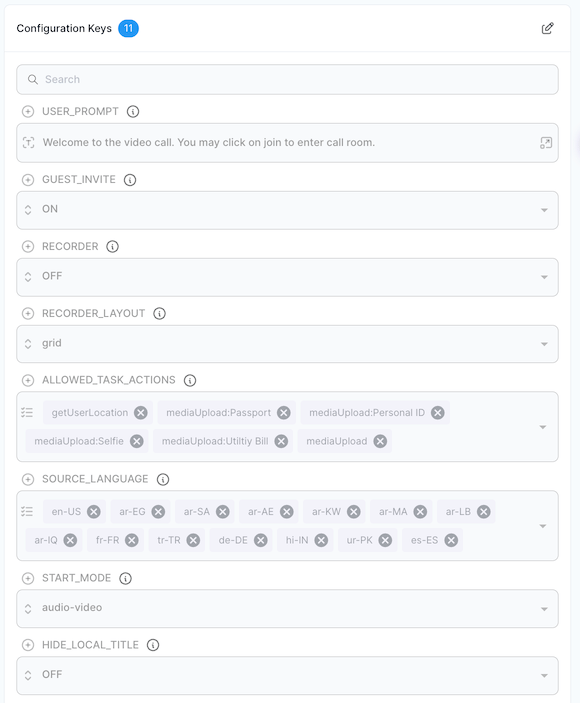
  <Step title="Configure PowerLink Action Parameters">
    Set up the action’s configuration parameters such as `SOURCE_LANGUAGE` or `USER_PROMPT`, depending on your expected usage scenario.

    <img src="https://mintcdn.com/agentix-5c0a3d87/nRZdjUb99nMM2ncE/user-guide/images/realtime-config.png?fit=max&auto=format&n=nRZdjUb99nMM2ncE&q=85&s=f6004201ab8c52e6cda4cee6a50de525" alt="Configure Realtime PowerLink" className="rounded-lg" width="580" height="703" data-path="user-guide/images/realtime-config.png" />
  </Step>

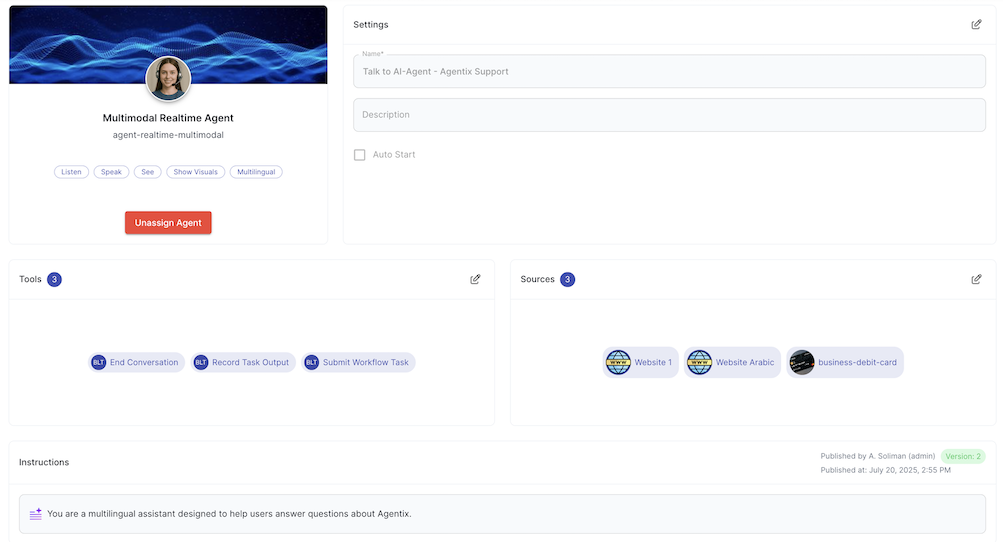
  <Step title="Configure Agent Instructions, Sources and Tools">
    Define the instructions, knowledge sources and function tools required by the assigned agent to handle the conversation effectively.

    <img src="https://mintcdn.com/agentix-5c0a3d87/3fWHT_5u43zyi8Am/user-guide/images/configure-action.png?fit=max&auto=format&n=3fWHT_5u43zyi8Am&q=85&s=bc3527bc788dd4aaf3f1aca2e108565a" alt="Configure Action" className="rounded-lg" width="1003" height="542" data-path="user-guide/images/configure-action.png" />
  </Step>

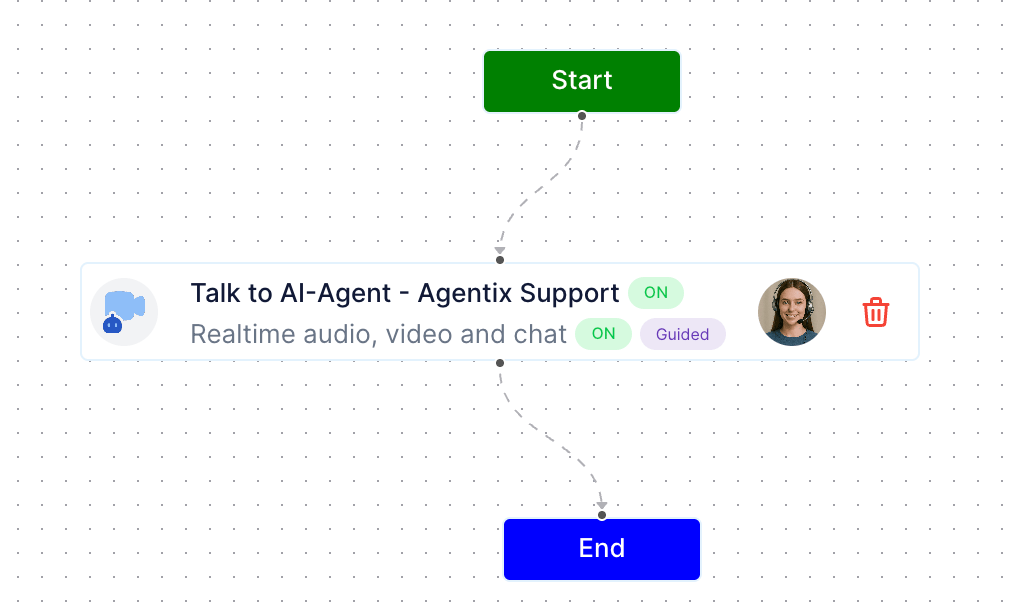
  <Step title="Attach to Workflow">
    Add the action to a workflow using workflow studio.

    <img src="https://mintcdn.com/agentix-5c0a3d87/nRZdjUb99nMM2ncE/user-guide/images/workflow-add-action.png?fit=max&auto=format&n=nRZdjUb99nMM2ncE&q=85&s=875461b5e0aa31f63df5ff5b83a26954" alt="Attach to Workflow" className="rounded-lg" width="1014" height="616" data-path="user-guide/images/workflow-add-action.png" />
  </Step>

  <Step title="Test the Live Session">
    From **LaunchPad** or Create New Job or via API trigger, initiate a live session and confirm the agent joins, responds correctly and the task flow behaves as expected.
  </Step>
</Steps>