> ## Documentation Index
> Fetch the complete documentation index at: https://docs.agentixhub.ai/llms.txt
> Use this file to discover all available pages before exploring further.
# Introduction
> Discover how Agentix empowers you to design intelligent customer journeys across AI, human and self-service experiences—without writing any code.
## What is Agentix?
A no-code orchestration platform for designing, managing and launching intelligent customer journeys—combining **self-service**, **guided** and **automated** experiences, all without writing a single line of code.
These journeys are built using modular, reusable app templates called **PowerLinks**—designed for web, voice, chat and media-driven interactions. Each step in the journey is defined as an **Action**, which can be handled by an AI, a human agent or the customer themselves.
Agentix enables seamless handoffs between automation, AI and human interaction within a single flow—ensuring a consistent, intelligent experience from start to finish. Everything is managed through an intuitive control panel built for speed, flexibility and scale.
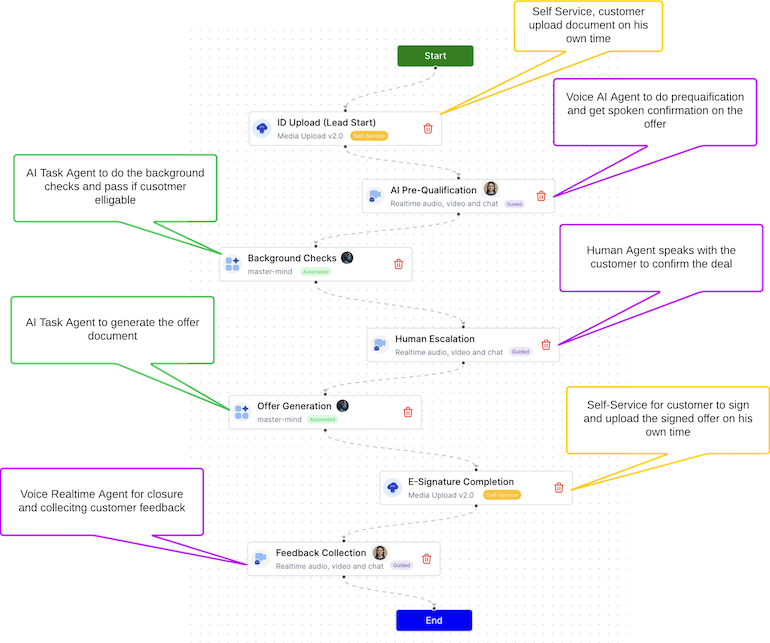 *A sample customer journey flow combining self-service, AI realtime & task agents and human support steps.*
## Why Agentix?
Modern customer journeys are no longer linear. Users expect fast answers, seamless transitions and real results—whether they're talking to an AI, filling out a form or chatting with a human agent.
In today’s fast-moving landscape, customer experience is no longer a back-office concern—it’s a strategic differentiator. Teams are expected to deliver seamless, intelligent interactions across channels—while balancing automation with human empathy.
But most processes today are fragmented:
* 🤖 AI handles one part of the flow.
* 🧑💼 Human agents step in on another system.
* 👤 The customer gets lost—waiting, repeating themselves or falling through the cracks.
**Agentix was built to fix this.**
It unifies **AI**, **human agents**, **automation** and the **customer** into one seamless journey:
* ✅ **Customers become stakeholders**, actively participating in the delivery process.
* 🔁 **AI and humans collaborate**, with context-aware, intelligent handoffs.
* 🔗 **No more broken steps**, disconnected tools or fragmented experiences.
Agentix ensures your flows stay **smart**, **adaptive** and **human**—all orchestrated through an intuitive control panel, without writing a single line of code.
## What Makes Agentix Different?
* ⚡ **Rapid Adaptability**: Make changes to live journeys in minutes—not days. No redeployments. No dev backlog.
* 🧠 **Multi-AI Support**: Plug in different AI providers (OpenAI, Azure, Google, etc.) at different stages of the journey.
* 🔌 **Built for Integration**: Connect effortlessly to your tools, KB Sources, APIs, databases or external services.
* 🛠️ **Reusable Building Blocks**: PowerLinks and tools are modular and repeatable across use cases.
* 📈 **Business-Centric Design**: Everything is built for visibility, governance and continuous improvement.
## Who Uses Agentix?
Agentix is designed for teams that need to build and manage customer journeys across various channels, for example:
* **Customer Support**: Automate and enhance support interactions with AI and human agents.
* **Customer Service**: Offer realtime AI agent self-service options for common tasks while providing guided assistance for complex issues.
* **Sales & Marketing**: Create guided workflows for lead qualification and customer engagement.
* **Operations**: Streamline internal processes with self-service and automated actions.
* **Product Teams**: Design user onboarding and training experiences that adapt to customer needs.
* **Field Teams**: Enable remote workers to access information and complete tasks using AI assistance.
* **Compliance & QA**: Monitor interactions and ensure adherence to standards through automated reviews.
## What You Can Do with Agentix?
* 🧩 **Build with PowerLinks**\
Use modular app templates for web, voice, chat and media—designed for Self-Service, Guided and Automated use cases.
* 🧠 **Design Flows Visually**\
Orchestrate entire journeys with drag-and-drop logic using the no-code Workflow Designer.
* 🧑💼 **Assign the Right Agents**\
Configure AI agents, human support and task handlers to collaborate across steps.
* 🧰 **Plug in Tools and Knowledge**\
Add form processors, document uploaders, lookup tools, connect your mcp-servers or external knowledge sources with ease.
* 📊 **Track Everything**\
Monitor job and task activity, agent usage, success rates and user engagement in real time.
## Learn About Agentix Building Blocks
These foundational building blocks explain how Agentix structures and powers intelligent customer journeys—from modular flows to AI agents and real-time task execution.
Understand how reusable PowerLinks define user interactions and service modes.
Discover how Actions are the smallest configurable units of a customer journey.
Learn about AI-Agents that guide or complete user interactions.
Visually design how Actions and PowerLinks are orchestrated into journeys.
Feed external knowledge and real-time data into your AI-Agents and tools.
Extend your PowerLinks with backend logic, API calls and processing utilities.
Track and manage full execution contexts as users engage with PowerLinks.
Represent individual user or agent steps within each job flow.
## 🚀 Start Based on Your Role
* [Quickstart for Managers](/user-guide/getting-started/quickstart-manager)
* [Quickstart for Job-Hub Users](/user-guide/getting-started/quickstart-user)
*A sample customer journey flow combining self-service, AI realtime & task agents and human support steps.*
## Why Agentix?
Modern customer journeys are no longer linear. Users expect fast answers, seamless transitions and real results—whether they're talking to an AI, filling out a form or chatting with a human agent.
In today’s fast-moving landscape, customer experience is no longer a back-office concern—it’s a strategic differentiator. Teams are expected to deliver seamless, intelligent interactions across channels—while balancing automation with human empathy.
But most processes today are fragmented:
* 🤖 AI handles one part of the flow.
* 🧑💼 Human agents step in on another system.
* 👤 The customer gets lost—waiting, repeating themselves or falling through the cracks.
**Agentix was built to fix this.**
It unifies **AI**, **human agents**, **automation** and the **customer** into one seamless journey:
* ✅ **Customers become stakeholders**, actively participating in the delivery process.
* 🔁 **AI and humans collaborate**, with context-aware, intelligent handoffs.
* 🔗 **No more broken steps**, disconnected tools or fragmented experiences.
Agentix ensures your flows stay **smart**, **adaptive** and **human**—all orchestrated through an intuitive control panel, without writing a single line of code.
## What Makes Agentix Different?
* ⚡ **Rapid Adaptability**: Make changes to live journeys in minutes—not days. No redeployments. No dev backlog.
* 🧠 **Multi-AI Support**: Plug in different AI providers (OpenAI, Azure, Google, etc.) at different stages of the journey.
* 🔌 **Built for Integration**: Connect effortlessly to your tools, KB Sources, APIs, databases or external services.
* 🛠️ **Reusable Building Blocks**: PowerLinks and tools are modular and repeatable across use cases.
* 📈 **Business-Centric Design**: Everything is built for visibility, governance and continuous improvement.
## Who Uses Agentix?
Agentix is designed for teams that need to build and manage customer journeys across various channels, for example:
* **Customer Support**: Automate and enhance support interactions with AI and human agents.
* **Customer Service**: Offer realtime AI agent self-service options for common tasks while providing guided assistance for complex issues.
* **Sales & Marketing**: Create guided workflows for lead qualification and customer engagement.
* **Operations**: Streamline internal processes with self-service and automated actions.
* **Product Teams**: Design user onboarding and training experiences that adapt to customer needs.
* **Field Teams**: Enable remote workers to access information and complete tasks using AI assistance.
* **Compliance & QA**: Monitor interactions and ensure adherence to standards through automated reviews.
## What You Can Do with Agentix?
* 🧩 **Build with PowerLinks**\
Use modular app templates for web, voice, chat and media—designed for Self-Service, Guided and Automated use cases.
* 🧠 **Design Flows Visually**\
Orchestrate entire journeys with drag-and-drop logic using the no-code Workflow Designer.
* 🧑💼 **Assign the Right Agents**\
Configure AI agents, human support and task handlers to collaborate across steps.
* 🧰 **Plug in Tools and Knowledge**\
Add form processors, document uploaders, lookup tools, connect your mcp-servers or external knowledge sources with ease.
* 📊 **Track Everything**\
Monitor job and task activity, agent usage, success rates and user engagement in real time.
## Learn About Agentix Building Blocks
These foundational building blocks explain how Agentix structures and powers intelligent customer journeys—from modular flows to AI agents and real-time task execution.
Understand how reusable PowerLinks define user interactions and service modes.
Discover how Actions are the smallest configurable units of a customer journey.
Learn about AI-Agents that guide or complete user interactions.
Visually design how Actions and PowerLinks are orchestrated into journeys.
Feed external knowledge and real-time data into your AI-Agents and tools.
Extend your PowerLinks with backend logic, API calls and processing utilities.
Track and manage full execution contexts as users engage with PowerLinks.
Represent individual user or agent steps within each job flow.
## 🚀 Start Based on Your Role
* [Quickstart for Managers](/user-guide/getting-started/quickstart-manager)
* [Quickstart for Job-Hub Users](/user-guide/getting-started/quickstart-user)