> ## Documentation Index
> Fetch the complete documentation index at: https://docs.agentixhub.ai/llms.txt
> Use this file to discover all available pages before exploring further.
# Workflows
> Define and manage the flow of customer journeys using visual orchestration
## Definition
**Workflows** define the overall **flow and orchestration logic** of a customer journey. They connect **PowerLinks**, **Actions**, **Agents** and **Tools** into complete experiences that span from start to finish.
Each Workflow acts as a **visual program**, enabling you to automate complex logic, guide users and handle multiple outcomes using intuitive drag-and-drop blocks.
You build workflows visually using the **Workflow Designer**.
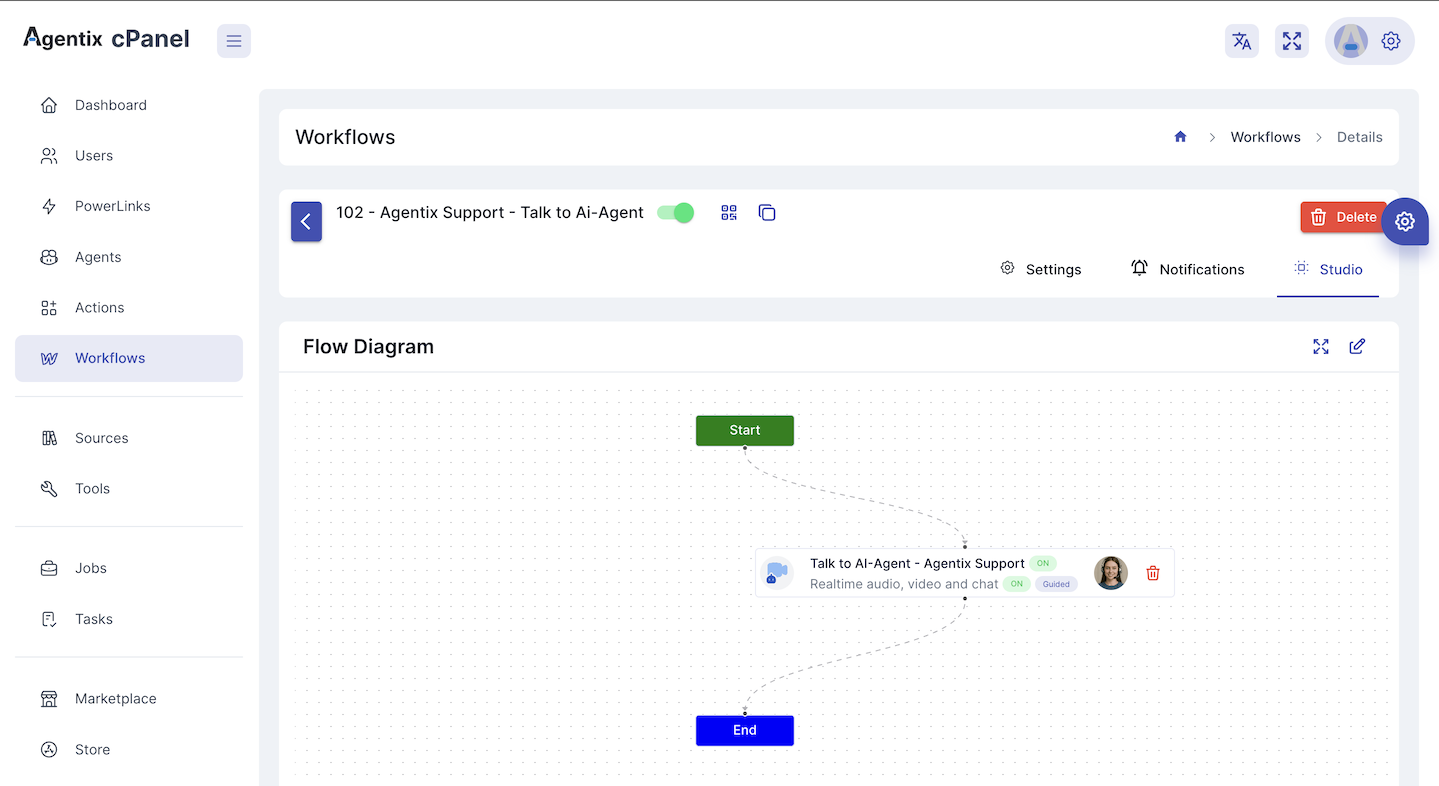 *A sample workflow with single step.*
## What Workflows Do
Workflows determine:
* ✅ When to trigger each **Action** of specific **PowerLink**
* 🔁 Sequence of data flow between steps
* 🔐 Whether login is required and which type (PIN, OTP, Google)
* 📣 How notifications are sent via WhatsApp, Email or SMS
* 🎯 Completion rules and fallback handling for the journey
You can think of a Workflow as the **orchestration layer** that gives structure, logic and intelligence to your customer experiences.
## Key Configuration
Each Workflow includes:
### 🔐 Login Requirements
You can define whether the customer needs to log in before starting the journey. Supported login methods include:
* PIN Code
* One-Time Password (OTP)
* Google Authentication
You can also configure session timeout, retry limits and lockout duration.
### 📣 Notification Settings
Customize how and when notifications are sent for LaunchPad triggers or login codes via:
* WhatsApp
* SMS
* Email
Each channel can be independently toggled and tailored.
### 🧱 Workflow Studio
Use the drag-and-drop **Studio** to:
* Build your workflow with PowerLinks, actions and conditions
* Define branching logic based on forms, tool results or user input
* Assign AI or human agents to each action
* Visually preview your journey before publishing
*A sample workflow with single step.*
## What Workflows Do
Workflows determine:
* ✅ When to trigger each **Action** of specific **PowerLink**
* 🔁 Sequence of data flow between steps
* 🔐 Whether login is required and which type (PIN, OTP, Google)
* 📣 How notifications are sent via WhatsApp, Email or SMS
* 🎯 Completion rules and fallback handling for the journey
You can think of a Workflow as the **orchestration layer** that gives structure, logic and intelligence to your customer experiences.
## Key Configuration
Each Workflow includes:
### 🔐 Login Requirements
You can define whether the customer needs to log in before starting the journey. Supported login methods include:
* PIN Code
* One-Time Password (OTP)
* Google Authentication
You can also configure session timeout, retry limits and lockout duration.
### 📣 Notification Settings
Customize how and when notifications are sent for LaunchPad triggers or login codes via:
* WhatsApp
* SMS
* Email
Each channel can be independently toggled and tailored.
### 🧱 Workflow Studio
Use the drag-and-drop **Studio** to:
* Build your workflow with PowerLinks, actions and conditions
* Define branching logic based on forms, tool results or user input
* Assign AI or human agents to each action
* Visually preview your journey before publishing
 ## Example Use Cases
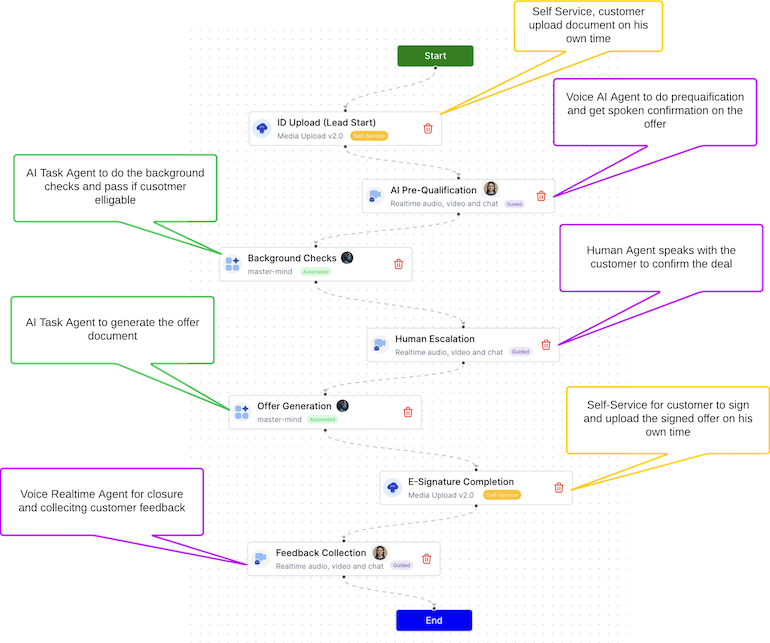
A multi-step flow that asks users to upload ID, verify details and receive approval using both Task and Realtime agents.
A guided workflow that starts with self-service answers, then escalates to live chat if issues aren't resolved.
A conditional workflow with eligibility checks, document uploads and AI-based approval logic.
## Best Practices
* Break complex journeys into modular **PowerLinks**
* Keep each **Action** focused and purpose-driven
* Use fallback flows for error handling and re-engagement
* Reuse tools and prompts across different workflows
* Analyze job and task performance to improve step logic
***
> 👉 Ready to build? See the [Workflow Designer Guide](/user-guide/workflows/designer)
## Example Use Cases
A multi-step flow that asks users to upload ID, verify details and receive approval using both Task and Realtime agents.
A guided workflow that starts with self-service answers, then escalates to live chat if issues aren't resolved.
A conditional workflow with eligibility checks, document uploads and AI-based approval logic.
## Best Practices
* Break complex journeys into modular **PowerLinks**
* Keep each **Action** focused and purpose-driven
* Use fallback flows for error handling and re-engagement
* Reuse tools and prompts across different workflows
* Analyze job and task performance to improve step logic
***
> 👉 Ready to build? See the [Workflow Designer Guide](/user-guide/workflows/designer)